Sign-up sheets without the clutter.
A sign-up sheet for scheduled shifts, item quantities, or hours, without advertisements or a login. Create a sign-up sheet, share a link, and people join in seconds.
Create an accountThe opposite of a busy sign-up sheet
All-in-one platforms add fundraisers, stores, and advertisements until the sign-up sheet itself feels noisy. Volunteesy does one job, a sign-up sheet, and it does that job calmly.
How to make a sign-up sheet in minutes
Make a sign-up sheet in three steps. Share one link, people join from a phone, and you export the list without a spreadsheet.

Step 1
Create a Sheet
Name the event and add the shifts, items, or hours you need. Most organizers finish the sheet in about thirty seconds, including a QR code when people will log hours.

Step 2
Share the Link or QR
Print the link, text it, or project the QR code so volunteers can open the sheet on any phone. There is nothing to install.

Step 3
People Sign Up
They tap a slot or scan the code, enter a name, and sign up or log hours. There is no application to install, no account to create, and no training to schedule.
A sign-up sheet with no ads and no accounts

Never an advert
Advertisements do not appear on the free sheet, and they do not appear on the premium sheet. Volunteers should see your event, not a third-party pitch you cannot vet.

No volunteer accounts
Open the link and enter a name. Optional passwords exist only if someone wants to look back at their own hours.

Yours to brand
Colours, a logo, and the overall look belong to you. You are not restricted to a catalogue of party, picnic, or classroom themes.

Free forever
Unlimited sheets stay free. When you want extras, unlock that sheet for a one-off $6, not a subscription that exists only to hide ads.

A sign-up sheet that looks like your event, not a template
Someone opens your link and decides in a glance. They should recognize the spring musical, the Saturday cleanup, or the class party, not a stock party theme, and not an advertisement you did not choose.
Pick a page color so the list stays plain: your shifts, your items, and your name. There is no sidebar of advertisements, no competing banners, and no suggestion you might also like.
A premium sheet can go further. Add a header image, set your own colors, and hide the Volunteesy footer so the page reads as yours.
Sign-up sheets for shifts, items, and hours
Use one link for scheduled shifts, for item quantities, or for hours. People join that sheet without creating an account or completing a registration.

Jobs with a schedule
List the scheduled shifts you need covered. Volunteers claim a time from one link, and you see who is coming.

Items & quantities
Collect snacks, prizes, or props, set the quantities you need, and see what is still missing.

Jobs with hours
Print one QR code so volunteers can check in and check out, and their hours add up automatically.
QR check-in on your sign-up sheet
A sign-up tells you who meant to come, and when they scan your QR code, Volunteesy logs the hours automatically. If they had claimed a shift, that shift is marked fulfilled too, and there is no spreadsheet to reconcile after the night ends.
- Check in and check out, or type the hours.
- You choose how volunteers record their time.
- One QR code works on a printed sign or on your phone.
- Export a CSV of the sign-ups when you need a report.
- Volunteers need no application and no account to check in.

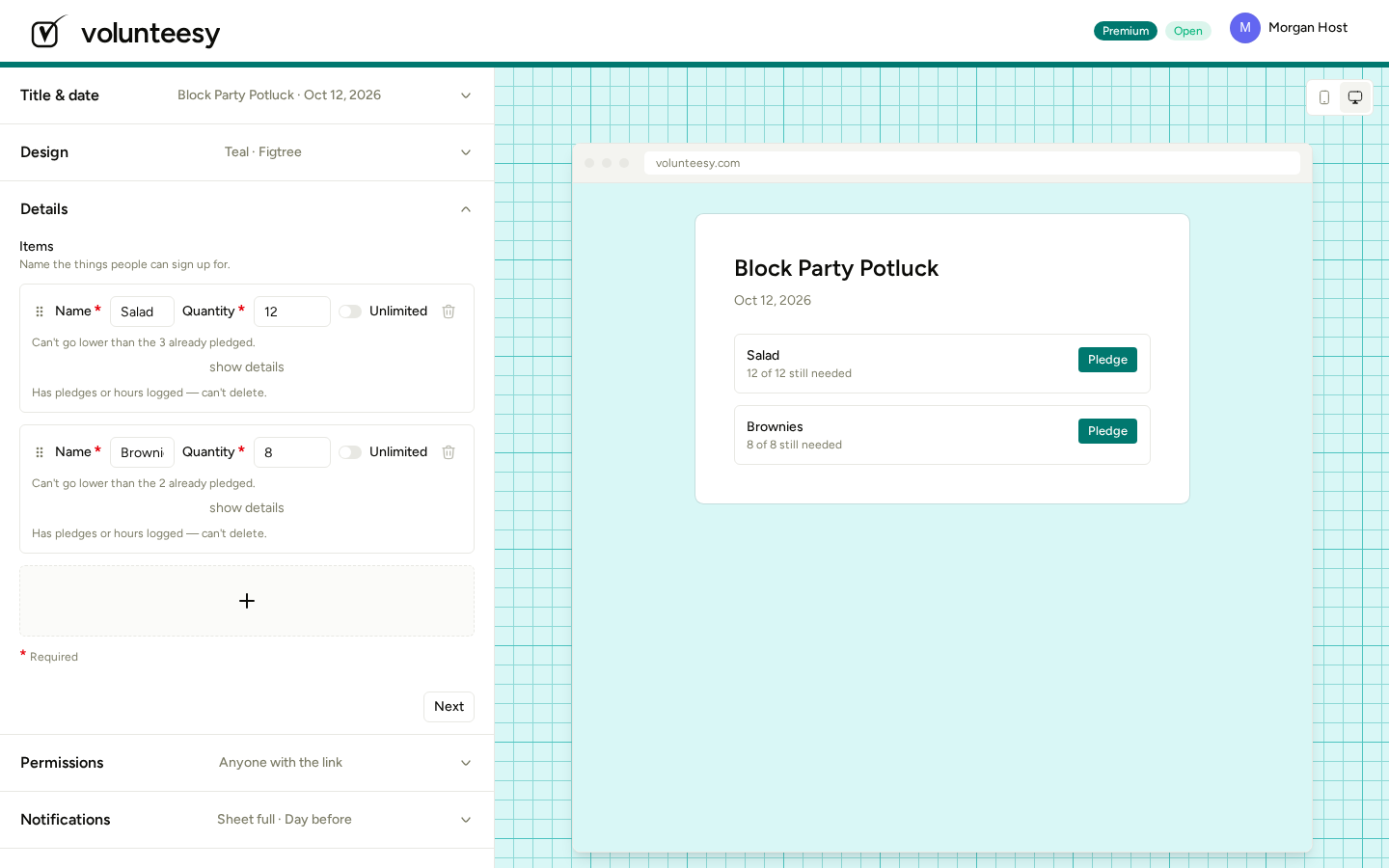
Built for someone making their own sign-up sheet
- The interface stays modern and quiet for non-technical organizers.
- Volunteers do not download an application, and the sheet works on any smartphone.
- You control the personal information, connections are encrypted in transit, and the database is encrypted at rest.
- You can export or delete your personal information at any time.
Free sign-up sheets. Pay only to upgrade one.
Unlimited sheets, QR hour logging, and no ads, always. Premium is a one-off $6 on a single sheet for extra colors, extra reminder schedules, invite-only responses, private sign-ups, and a printable roster.
See free vs premiumSign-up sheet FAQ
What is a Volunteesy sign-up sheet?
A Volunteesy sign-up sheet is a shared page for scheduled shifts, item quantities, or hours. You create the sheet, share one link, and people join from any phone. There are no advertisements on the page, and volunteers never complete a registration. Hours sheets add a daily QR code when people need to check in.
How do volunteers log hours with a QR code?
Volunteers log hours with a QR code by scanning the daily code on a sign or the organizer's phone. They enter a name, check in on arrival, and check out when they leave so Volunteesy can calculate the time. With single-scan they scan once and type the hours instead. No app and no account are required.
Do volunteers need an app?
No. Volunteers do not need an app to log hours or join a sign-up sheet. They open the shared link or scan the QR code in any phone browser, enter a name, and check in. There is no download and no account to create. A password is optional, and only for people who later want to see their own hours.
Can volunteers log hours without creating an account?
Yes. Volunteers can log hours without creating an account. They scan the daily QR code or open the sheet link, enter a name, and check in. Volunteesy keeps those hours on the sheet for your reports. A password is optional and only lets someone look back at their own history later. There is no app to download.
How do I track volunteer hours with Volunteesy?
You track volunteer hours with Volunteesy in three steps. Create an hours sheet and add the jobs people do. Share the link or print the daily QR code where volunteers arrive. They scan, enter a name, and check in and out. You then export a CSV when a grant or the school needs the totals.
How do I export volunteer hours for a grant?
You export volunteer hours for a grant as a CSV of totals by volunteer and by job. Open the hours sheet, download the report, and drop it into the grant application or board packet. The file is the same hours volunteers logged by scanning a QR code or by typing hours, so you do not rebuild a spreadsheet by hand.
Can I track community service hours?
Yes. You can track community service hours the same way you track any other volunteer time. Create an hours sheet, post the daily QR code, and students or volunteers check in and out or type their hours. Export a CSV by person when a school, court, or scholarship asks for a record. No app is required.
Do I need a spreadsheet to track volunteer hours?
No. You do not need a spreadsheet to track volunteer hours. Volunteesy records check-in and check-out from a daily QR code and keeps the total on the hours sheet. When a grant, school, or board asks, export a CSV by volunteer or by job. Volunteers join from a phone browser, so you are not chasing people for a form.
How is Volunteesy different from VolunteerHub, SignUpGenius, or a spreadsheet?
Volunteesy is different from VolunteerHub, SignUpGenius, and a spreadsheet because the sign-up page stays free of ads and volunteers never create an account. A spreadsheet makes you retype hours after the event. Sign-up sites often stop at who pledged a shift. Volunteesy also logs hours with a daily QR code and exports a CSV for grants.
Ready for a sign-up sheet that looks like you?
Create an accountCustom styling stays on your sheet, advertisements stay off, and sign-up sheets stay free.